
Indexing is not the same thing as publishing. A page exists the moment you hit publish; it enters the Google index only after Google has discovered the URL, fetched it, rendered it, and decided it is worth storing. Every one of those four steps can fail silently, and the page still returns a 200 to you and to anyone who visits it.
That gap is why “my site is not ranking” is usually the wrong question. The right one is more specific: at which stage did this URL stop? This guide walks the pipeline stage by stage and shows what each stopping point looks like from outside.
Crawl, render, index, serve
Google’s crawler discovers a URL from a sitemap, a link, or a redirect. It fetches the page and looks at the status code. It renders the page – running JavaScript – and extracts links. Then it decides whether to store the page in its index, and finally whether to serve it for any query.
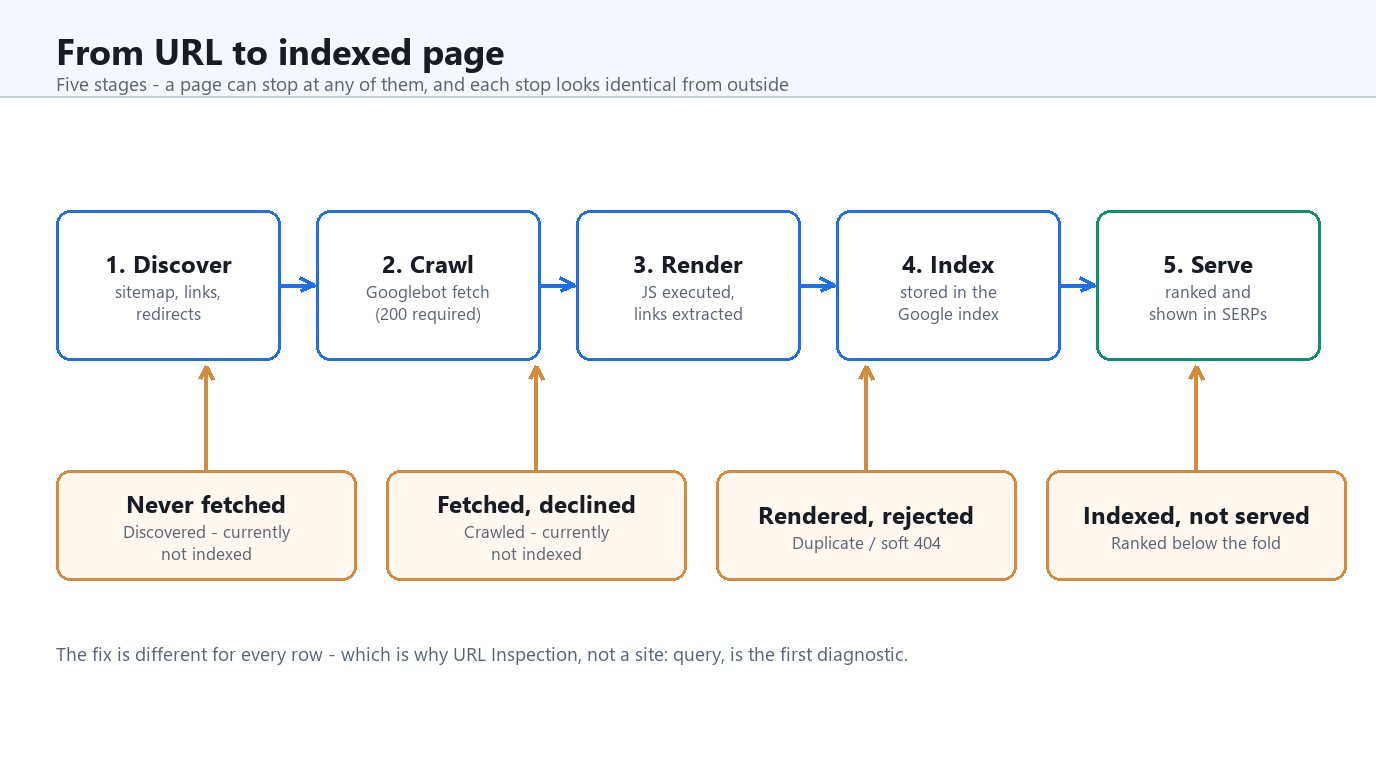
The stages are described in Google’s own crawling and indexing overview, which is worth reading once in full – most indexing problems are one of the situations described there, not a bug.
What makes a page crawlable
- It returns 200. A 404, a 5xx, or a redirect chain means the crawler never sees content. A redirect is not a failure, but three hops is a reason to be crawled less often.
- robots.txt allows it. A blocked URL is never fetched, and Google cannot read a noindex on a page it is not allowed to fetch – so blocking plus noindex is a permanent exclusion.
- Something links to it. A URL that exists only in a sitemap is discovered, but sitemap-only URLs get crawled far more slowly than linked ones. Internal links are the crawl budget you control.
- The server is fast enough to be worth the crawl. Crawl rate follows response time; a site that answers in two seconds is crawled less than one that answers in 200ms.
What makes a page indexable
Crawlable is necessary, not sufficient. Once fetched, the page has to be worth storing:
- No
noindexmeta tag or header, and noX-Robots-Tag: noindex. - A self-referencing canonical. A canonical pointing elsewhere tells Google this page is a duplicate of that one.
- Content that is not a near-duplicate of a page it already has. This is what “Duplicate, Google chose a different canonical” means.
- Enough substance to be a distinct answer. Thin pages get crawled and declined rather than indexed.
“Discovered – currently not indexed” vs “Crawled – currently not indexed”
These two states look identical in a rank tracker and mean completely different things:
Discovered – currently not indexed means Google knows the URL exists but has not fetched it. Read that as a crawl-priority problem: nothing links to it strongly enough to make it worth a fetch. The fix is internal links, a cleaner sitemap, and time on a site Google already trusts.
Crawled – currently not indexed means Google fetched the page and decided not to store it. That is a quality or duplication verdict, or a site-level trust verdict when it happens to every page on a domain. The fix is not technical: it is more substance, fewer near-duplicates, and more links pointing at the pages that should lead the site.
Site-level indexing beats page-level indexing
Individual pages are judged against the site they live on. Two sites can publish the same page, and the one on a domain Google already crawls and trusts gets indexed in a day while the other sits in “Crawled – currently not indexed” for months. This is why rebuilding a domain’s content without rebuilding its index footprint produces a site that looks fine and ranks for nothing.
The practical consequence: if every page on a site is unindexed, do not audit page by page. Fix the site-level signals first – crawl paths, internal links, a clean sitemap, a steady publishing cadence – then re-test three URLs. When a whole domain is in the same state, the pages are not the problem.
How to check your own pages
Use URL Inspection in Search Console, one URL at a time, on the homepage and two articles. It reports the exact state, the last crawl date, the user-declared canonical and the Google-selected canonical. Three URLs are enough to tell you whether you have a discovery problem, a quality problem, or neither.
Then check the same URL with a plain user agent. If Googlebot and curl get identical bytes, there is no cloaking, no bot wall and no WAF problem – a fact worth establishing before you open a hosting ticket. If they differ, stop and fix that first.
How to speed up indexing
- Link internally. Every new page should be linked from at least two existing pages with descriptive anchors. This is the highest-leverage change and it costs nothing.
- Keep the sitemap clean. Only canonical, 200-status, indexable URLs. A sitemap full of 404s teaches Google to crawl your sitemap less.
- Push IndexNow for Bing and Yandex. Rank Math’s Instant Indexing module does it in one switch; it does not affect Google.
- Request indexing in Search Console. Roughly ten URLs a day, on the pages that matter most. It is a nudge, not a guarantee, and it queues the URL rather than fetching it on demand – expect a re-crawl within days, not minutes.
- Publish consistently. A site that adds real pages weekly gets crawled more than one that added twenty at once and stopped, and the crawler treats an abandoned section as low priority within a month or two
For sites that run automation, the same rules apply to the properties the automation builds – a tier 2 page that is never indexed is a wasted submission. That is the reason the tiered link building framework treats the indexing layer as a separate stage instead of assuming it happens.
FAQ
How long does Google take to index a new page?
Anywhere from a day to never. On a site Google already crawls daily, a well-linked page can be indexed within 24-48 hours. On a low-trust or rebuilt domain, “Discovered” can persist for weeks regardless of what you do.
Does submitting a sitemap guarantee indexing?
No. A sitemap is a discovery hint. It tells Google the URL exists; it does not ask it to index the page, and a page in a sitemap can sit in “Discovered – currently not indexed” indefinitely.
Does IndexNow work for Google?
No. IndexNow is a Bing and Yandex protocol. For Google you use the sitemap plus URL Inspection’s request-indexing, and there is no equivalent instant API for general publishers.
Can a noindexed page still be crawled?
Yes – crawling and indexing are separate decisions. But a page blocked by robots.txt cannot be crawled, so its noindex is never seen, which is why the two together create a permanent exclusion.
What to read next
If the diagnosis turned out to be a discovery problem, the fix is usually an internal link pass and a backlink profile that actually exists – start with how to check backlinks, then the link building tool stack for the crawlers worth paying for, and the GSA SER guide if automation is part of how those links get built.