
You can check a site’s backlinks in about four minutes, for free, and get a list that is 60% wrong. That is not because the tools are bad – it is because “backlinks” means three different lists depending on who is answering: what Google credits, what a crawler found, and what the page actually serves in its HTML. This guide shows how to pull all three and reconcile them into one list you can act on.
I check backlink profiles weekly for my own sites and for clients, and the process has not changed much since 2019 – only the tools’ pricing has. What follows is the order I run it in, and the mistakes that cost the most time.
Why the free tools disagree
Search Console only knows links Google has crawled and counted. A third-party crawler (Ahrefs, Semrush, DataForSEO) crawls the web on its own schedule and misses whatever it has not visited. A manual check of the raw HTML shows you what the page serves right now, including links that a crawler’s cache says are gone.
So the three sources are not duplicates of each other. They are three snapshots taken at different times by different robots. Treat them as one dataset only after you have deduplicated by referring domain – see below.
Method 1: Search Console links report
The Links report in Search Console is the only list Google itself publishes, which makes it the closest thing to “links that count”. It is also the most incomplete: Google samples the list, and it only shows links from pages it has crawled recently.
- Open Search Console, pick the domain property, then Links in the left nav.
- Read Top linked pages first – that tells you which of your URLs are earning links, not which anchors you want.
- Then Top linking sites and export. That export is your starting list.
- Ignore the “internal links” block for this task; it is a crawl diagnostic, not a backlink source.
Google’s own documentation on crawlable links is the reference for why some of your links never show up here: JavaScript-only links, links behind forms, and links with the wrong rel attribute can all be dropped.
Method 2: a third-party crawler
Ahrefs, Semrush and the DataForSEO backlinks endpoint each maintain their own index. They find links Google’s report omits – especially tier 2 and tier 3 layers, which is exactly what most link builders care about. The trade-off is noise: they also report links from pages Google has never indexed, which is a link that will never pass anything.
- Pull referring domains, not individual backlinks. A domain-level view is the only one that survives deduplication.
- Sort by domain rank or traffic, not by link count. Forty links from one forum are one vote.
- Check the spam score column before you do anything else with the list.
Method 3: the manual spot check
For any link you are about to rely on, fetch the page and look at the raw HTML. This catches three things a cached index cannot: whether the link is still there, whether it is rel="nofollow" or rel="ugc", and whether the anchor text matches what you paid for. It takes one minute per link and it is the step people skip.
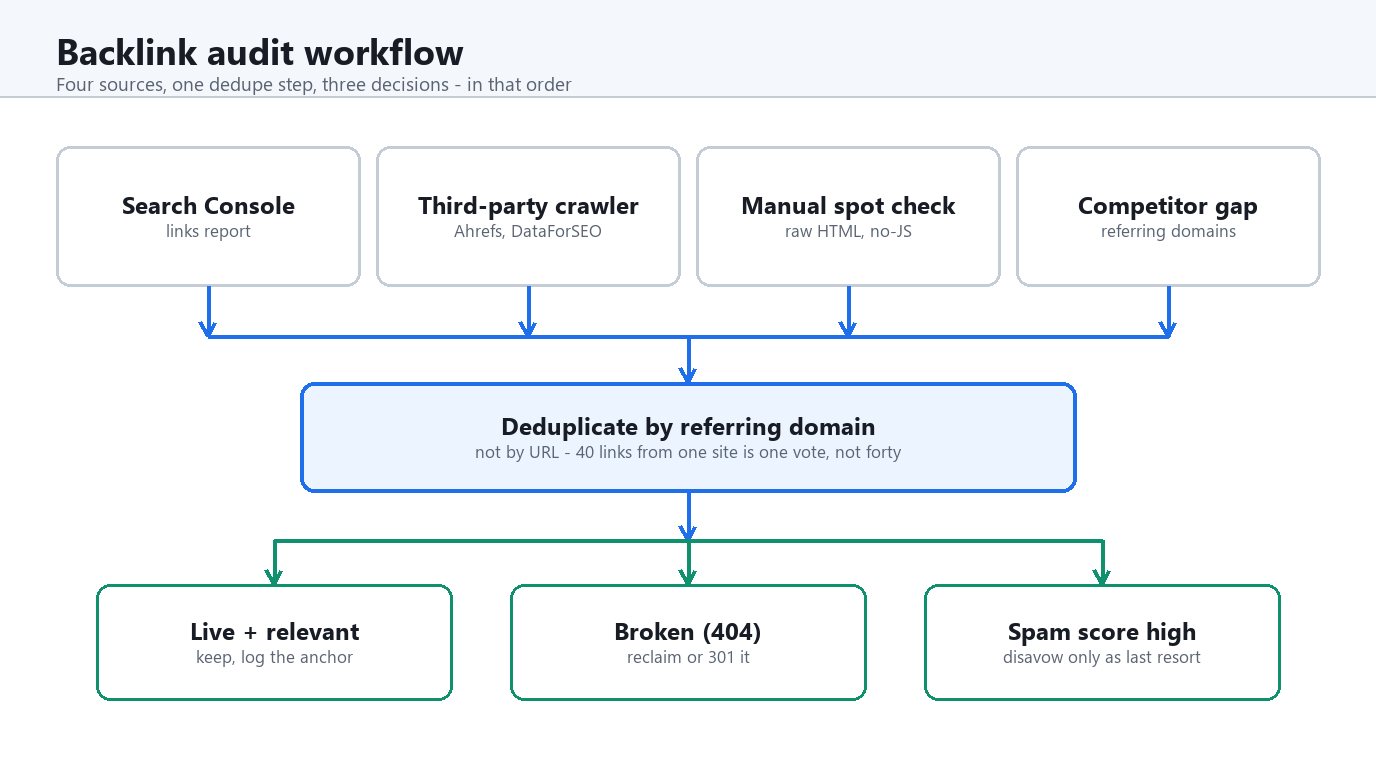
The dedupe step nobody does
Every guide tells you to export the list. Almost none tells you what to do next, which is: collapse the list to one row per referring domain. Forty links from one site is one vote, and if that site is a spam farm it is one problem, not forty – but a per-URL view will make you believe you have a link profile you do not have.
Deduplicate on the registrable domain (the part before the first dot after the www), keep the best link from each, and record: domain, target URL, anchor, follow status, and whether the page is still live. That is the whole schema. Anything more is a spreadsheet hobby.
What to do with the list
| What you found | Action | Why |
|---|---|---|
| Live, relevant, followed | Keep it, log the anchor | This is the profile you want to grow – mirror its anchor mix in new links |
| Live but 404 on the target | Reclaim: 301 the old URL back to the closest live page | Recovering a broken backlink is cheaper than building a new one |
| Dead source page | Ask for a replacement link, or drop it | A dead page passes nothing; chasing it is sunk cost |
| High spam score, unrelated topic | Disavow only as a last resort, after everything else | Disavow removes a signal you may need; Google already ignores most junk |
A checklist that fits on one screen
- Export Search Console links (sampled, Google-credited).
- Export referring domains from one third-party crawler.
- Union both, dedupe on registrable domain.
- Spot-check the ten most valuable links in raw HTML.
- Mark broken targets and reclaim them with 301s.
- Log the anchor distribution before building anything new.
If your profile is mostly tier 2 and tier 3 – which is normal for anyone running automation – the anchor distribution you log here is the input to your next campaign, not a vanity metric. The layer design in tier 1, 2 and 3 link building assumes you already know what you have.
FAQ
How do I check backlinks for free?
Search Console’s Links report is the only free source from Google itself. For anything it omits, you need a crawler’s index – the free tiers of Ahrefs and Semrush both cap how many rows you can export per month.
Why does Search Console show fewer backlinks than Ahrefs?
Google samples the links report and only counts links from pages it has crawled and chosen to credit. A third-party crawler reports everything it found, including links on pages Google has not indexed.
Can I check backlinks without a paid tool?
Yes, if you are willing to spend time instead of money: fetch the candidate pages and read the HTML. That is slower but it is the only method that shows follow status and anchor text exactly as served.
Do nofollow backlinks count for anything?
They do not pass ranking signal directly, but they are still discovered, still visible to anyone auditing the profile, and still drive some referral traffic. Treat them as discovery surface, not as authority.
How often to check
Monthly is enough for a site you are building links to deliberately. Weekly if you are running automation at any scale, because the failure mode there is not “no links” – it is links that appeared, got crawled once, and were removed before anything passed. A weekly domain-level diff catches that; a monthly one usually does not.
Keep the diff, not just the current list. The interesting number is not how many referring domains you have, it is how many you gained and lost net over 30 days, and whether the ones you lost were the ones actually passing value. Anyone who has read Bing’s webmaster guidelines knows unnatural link growth is a liability, not a trophy – the diff is how you keep growth looking organic.
What to read next
Once you know what your profile looks like, the next decision is what to build against it. Start with the link building tool stack, then compare your verified rate against the GSA SER shopping list and a maintained verified target list.